
Création d'une application NextCloud
Les automatisations dans NextCloud
Flux
Les flux NextCloud permettent d'automatiser des actions comme :
-
Approuver ou refuser la publication de fichiers (en fonction de groupe / personne / tags / etc..)
-
Assigner des droits / des accès en fonction des tags utilisateurs ou groupes assignés aux utilisateurs, etc..
-
Purger automatiquement le contenu de dossiers à l'expiration d'un délai convenu.
-
Pour demander la validation de l'ajout de nouveaux fichiers dans un dossier.
-
...
Applications
Calendrier, Images Viewer, Mail, Partage plus ouvert, Activité, Outils Css, Racourci bar custom, Notes, Agenda, Taches, Shifts, News, Cartes, Keep : (Glisser pour valider ou non)
Rendez vous sur NextCloud pour plus d'informations sur les différentes application et utilité
Comment créer une application NextCloud ?
- Création de l'application via le generateur d'applications squelettes en entrant toute les informations.
- Supprimer tout les fichiers qui sont pas nécessaire au type d'application voulu.
- Création des fichiers en fonction de l'application a crée.
Exemple d'application (Hello World !)
-
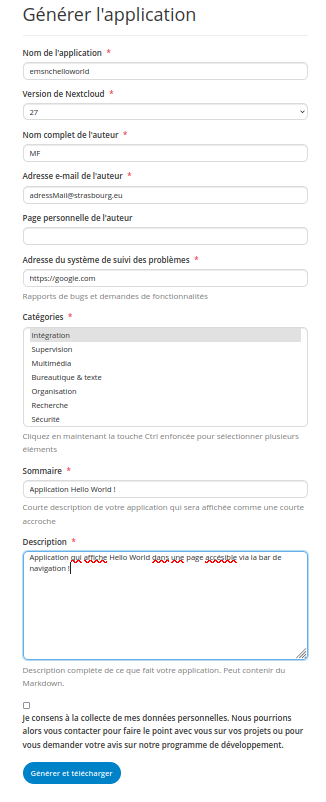
Création de l'applications squelette.
Il suffit d'entrer les informations de l'application. Elles seront modifiables dans le futur si besoin.
-
Une fois téléchargé sous forme
*.tar.gz, il faut extraire le fichier. -
Suppression des fichiers inutiles :
-
Le contenu de
src,templates,tests,lib/Service,lib/Db,lib/Migrationetlib/Controller. -
Supprimer
babel.config.jsetpsalm.xml -
Modifications / créations des fichiers :
-
Création du *BackEnd
- Remplacer le contenu de
lib/AppInfo/Application.phppar :
```php <?php namespace OCA\Emsnchelloworld\AppInfo;
use OCP\AppFramework\App; use OCP\AppFramework\Bootstrap\IRegistrationContext; use OCP\AppFramework\Bootstrap\IBootContext; use OCP\AppFramework\Bootstrap\IBootstrap;
class Application extends App implements IBootstrap {
public const APP_ID = 'emsnchelloworld';

public function __construct(array $urlParams = []) {
    parent::__construct(self::APP_ID, $urlParams);
}

public function register(IRegistrationContext $context): void {
}

public function boot(IBootContext $context): void {
}
}
``
- Remplacer le contenu de
appinfo/routes.php` par :```php <?php
return [ 'routes' => [ ['name' => 'page#index', 'url' => '/', 'verb' => 'GET'], ],
]; ```
- Remplacer le contenu de
-
Créer le fichier
lib/Controller/PageController.phpavec :```php <?php
namespace OCA\NoteBook\Controller; use OCP\AppFramework\Http\TemplateResponse; use OCP\AppFramework\Services\IInitialState; use OCP\Collaboration\Reference\RenderReferenceEvent; use OCP\EventDispatcher\IEventDispatcher; use OCP\IConfig; use OCP\IRequest; use OCP\AppFramework\Controller;
use OCA\NoteBook\AppInfo\Application; use OCP\PreConditionNotMetException;
class PageController extends Controller {
public function __construct(
    string   $appName,
    IRequest $request,
    private IEventDispatcher $eventDispatcher,
    private IInitialState $initialStateService,
    private IConfig $config,
    private ?string $userId
) {
    parent::__construct($appName, $request);
}

public function index(): TemplateResponse {
    $this->eventDispatcher->dispatchTyped(new RenderReferenceEvent());
    $notes = [];
    $selectedNoteId = (int) $this->config->getUserValue($this->userId, Application::APP_ID, 'selected_note_id', '0');
    $state = [
        'notes' => $notes,
        'selected_note_id' => $selectedNoteId,
    ];
    $this->initialStateService->provideInitialState('notes-initial-state', $state);
    return new TemplateResponse(Application::APP_ID, 'main');
}
} ```
-
Maintenant crée le fichier
templates/main.phpavec :php <?php $appId = OCA\Emsnchelloworld\AppInfo\Application::APP_ID; \OCP\Util::addScript($appId, $appId . '-main'); ?> -
Création du FrontEnd
-
Création du fichier
src/main.jsavec :```js import App from './views/App.vue' import Vue from 'vue' Vue.mixin({ methods: { t, n } })
const VueApp = Vue.extend(App) new VueApp().$mount('#content') ```
-
Créer le dossier
src/viewset le fichiersrc/views/App.vueavec :
<template>
<NcContent app-name="emsnchelloworld">
    <MyNavigation
        :notes="displayedNotesById"
        :selected-note-id="state.selected_note_id"
        @click-note="onClickNote"
        @export-note="onExportNote"
        @create-note="onCreateNote"
        @delete-note="onDeleteNote" />
    <NcAppContent>
        <MyMainContent v-if="selectedNote"
            :note="selectedNote"
            @edit-note="onEditNote" />
        <NcEmptyContent v-else
            :title="t('tutorial_5', 'Select a note')">
            <template #icon>
                <NoteIcon :size="20" />
            </template>
        </NcEmptyContent>
    </NcAppContent>
</NcContent>
</template>

<script>
import NcContent from '@nextcloud/vue/dist/Components/NcContent.js'
import NcAppContent from '@nextcloud/vue/dist/Components/NcAppContent.js'
import NcEmptyContent from '@nextcloud/vue/dist/Components/NcEmptyContent.js'

import NoteIcon from '../components/icons/NoteIcon.vue'

import MyNavigation from '../components/MyNavigation.vue'
import MyMainContent from '../components/MyMainContent.vue'

import axios from '@nextcloud/axios'
import { generateOcsUrl, generateUrl } from '@nextcloud/router'
import { showSuccess, showError, showUndo } from '@nextcloud/dialogs'
import { loadState } from '@nextcloud/initial-state'

import { Timer } from '../utils.js'

export default {
name: 'App',

components: {
    NoteIcon,
    NcContent,
    NcAppContent,
    NcEmptyContent,
    MyMainContent,
    MyNavigation,
},

props: {
},

data() {
    return {
        state: loadState('emsnchelloworld', 'notes-initial-state'),
    }
},

computed: {
    allNotes() {
        return this.state.notes
    },
    notesToDisplay() {
        return this.state.notes.filter(n => !n.trash)
    },
    displayedNotesById() {
        const nbi = {}
        this.notesToDisplay.forEach(n => {
            nbi[n.id] = n
        })
        return nbi
    },
    notesById() {
        const nbi = {}
        this.allNotes.forEach(n => {
            nbi[n.id] = n
        })
        return nbi
    },
    selectedNote() {
        return this.displayedNotesById[this.state.selected_note_id]
    },
},

watch: {
},

mounted() {
},

beforeDestroy() {
},

methods: {
    onEditNote(noteId, content) {
        const options = {
            content,
        }
        const url = generateOcsUrl('apps/emsnchelloworld/api/v1/notes/{noteId}', { noteId })
        axios.put(url, options).then(response => {
            this.notesById[noteId].content = content
            this.notesById[noteId].last_modified = response.data.ocs.data.last_modified
        }).catch((error) => {
            showError(t('emsnchelloworld', 'Error saving note content'))
            console.error(error)
        })
    },
    onCreateNote(name) {
        console.debug('create note', name)
        const options = {
            name,
        }
        const url = generateOcsUrl('apps/emsnchelloworld/api/v1/notes')
        axios.post(url, options).then(response => {
            this.state.notes.push(response.data.ocs.data)
            this.onClickNote(response.data.ocs.data.id)
        }).catch((error) => {
            showError(t('emsnchelloworld', 'Error creating note'))
            console.error(error)
        })
    },
    onDeleteNote(noteId) {
        console.debug('delete note', noteId)
        this.$set(this.notesById[noteId], 'trash', true)
        const deletionTimer = new Timer(() => {
            this.deleteNote(noteId)
        }, 10000)
        showUndo(
            t('emsnchelloworld', '{name} deleted', { name: this.notesById[noteId].name }),
            () => {
                deletionTimer.pause()
                this.notesById[noteId].trash = false
            },
            { timeout: 10000 }
        )
    },
    deleteNote(noteId) {
        const url = generateOcsUrl('apps/emsnchelloworld/api/v1/notes/{noteId}', { noteId })
        axios.delete(url).then(response => {
            const indexToDelete = this.state.notes.findIndex(n => n.id === noteId)
            if (indexToDelete !== -1) {
                this.state.notes.splice(indexToDelete, 1)
            }
        }).catch((error) => {
            showError(t('emsnchelloworld', 'Error deleting note'))
            console.error(error)
        })
    },
    onClickNote(noteId) {
        console.debug('click note', noteId)
        this.state.selected_note_id = noteId
        const options = {
            values: {
                selected_note_id: noteId,
            },
        }
        const url = generateUrl('apps/emsnchelloworld/config')
        axios.put(url, options).then(response => {
        }).catch((error) => {
            showError(t('emsnchelloworld', 'Error saving selected note'))
            console.error(error)
        })
    },
    onExportNote(noteId) {
        const url = generateOcsUrl('apps/emsnchelloworld/api/v1/notes/{noteId}/export', { noteId })
        axios.get(url).then(response => {
            showSuccess(t('emsnchelloworld', 'Note exported in {path}', { path: response.data.ocs.data }))
        }).catch((error) => {
            showError(t('emsnchelloworld', 'Error deleting note'))
            console.error(error)
        })
    },
},
}
</script>
- Maintenant, pour implémenter la barre de navigation, créer le dossier
src/componentset le fichiersrc/components/MyNavigation.vueavec :
<template>
    <NcAppNavigation>
        <template #list>
            <NcAppNavigationNewItem
                :title="t('emsnchelloworld', 'Create note')"
                @new-item="$emit('create-note', $event)">
                <template #icon>
                    <PlusIcon />
                </template>
            </NcAppNavigationNewItem>
            <h2 v-if="loading"
                class="icon-loading-small loading-icon" />
            <NcEmptyContent v-else-if="sortedNotes.length === 0"
                :title="t('emsnchelloworld', 'No notes yet')">
                <template #icon>
                    <NoteIcon :size="20" />
                </template>
            </NcEmptyContent>
            <NcAppNavigationItem v-for="note in sortedNotes"
                :key="note.id"
                :name="note.name"
                :class="{ selectedNote: note.id === selectedNoteId }"
                :force-display-actions="true"
                :force-menu="false"
                @click="$emit('click-note', note.id)">
                <template #icon>
                    <NoteIcon />
                </template>
                <template #actions>
                    <NcActionButton
                        :close-after-click="true"
                        @click="$emit('export-note', note.id)">
                        <template #icon>
                            <FileExportIcon />
                        </template>
                        {{ t('emsnchelloworld', 'Export to file') }}
                    </NcActionButton>
                    <NcActionButton
                        :close-after-click="true"
                        @click="$emit('delete-note', note.id)">
                        <template #icon>
                            <DeleteIcon />
                        </template>
                        {{ t('emsnchelloworld', 'Delete') }}
                    </NcActionButton>
                </template>
            </NcAppNavigationItem>
        </template>
    </NcAppNavigation>
</template>

<script>
import FileExportIcon from 'vue-material-design-icons/FileExport.vue'
import PlusIcon from 'vue-material-design-icons/Plus.vue'
import DeleteIcon from 'vue-material-design-icons/Delete.vue'

import NoteIcon from './icons/NoteIcon.vue'

import NcAppNavigation from '@nextcloud/vue/dist/Components/NcAppNavigation.js'
import NcEmptyContent from '@nextcloud/vue/dist/Components/NcEmptyContent.js'
import NcAppNavigationItem from '@nextcloud/vue/dist/Components/NcAppNavigationItem.js'
import NcActionButton from '@nextcloud/vue/dist/Components/NcActionButton.js'
import NcAppNavigationNewItem from '@nextcloud/vue/dist/Components/NcAppNavigationNewItem.js'

import ClickOutside from 'vue-click-outside'

export default {
    name: 'MyNavigation',

    components: {
        NoteIcon,
        NcAppNavigation,
        NcEmptyContent,
        NcAppNavigationItem,
        NcActionButton,
        NcAppNavigationNewItem,
        PlusIcon,
        DeleteIcon,
        FileExportIcon,
    },

    directives: {
        ClickOutside,
    },

    props: {
        notes: {
            type: Object,
            required: true,
        },
        selectedNoteId: {
            type: Number,
            default: 0,
        },
        loading: {
            type: Boolean,
            default: false,
        },
    },

    data() {
        return {
            creating: false,
        }
    },
    computed: {
        sortedNotes() {
            return Object.values(this.notes).sort((a, b) => {
                const { tsA, tsB } = { tsA: a.last_modified, tsB: b.last_modified }
                return tsA > tsB
                    ? -1
                    : tsA < tsB
                        ? 1
                        : 0
            })
        },
    },
    beforeMount() {
    },
    methods: {
        onCreate(value) {
            console.debug('create new note')
        },
    },
}
</script>
<style scoped lang="scss">
.addNoteItem {
    position: sticky;
    top: 0;
    z-index: 1000;
    border-bottom: 1px solid var(--color-border);
    :deep(.app-navigation-entry) {
        background-color: var(--color-main-background-blur, var(--color-main-background));
        backdrop-filter: var(--filter-background-blur, none);
        &:hover {
            background-color: var(--color-background-hover);
        }
    }
}

:deep(.selectedNote) {
    > .app-navigation-entry {
        background: var(--color-primary-light, lightgrey);
    }

    > .app-navigation-entry a {
        font-weight: bold;
    }
}
</style>
- Créer le dossier
src/components/iconset crée le fichiersrc/components/icons/NoteIcon.vueavec :
<template>
    <span :aria-hidden="!title"
        :aria-label="title"
        class="material-design-icon note-icon"
        role="img"
        v-bind="$attrs"
        @click="$emit('click', $event)">
        <svg
            :fill="fillColor"
            :width="size"
            :height="size"
            enable-background="new 0 0 24 24"
            version="1.1"
            viewBox="0 0 24 24"
            xml:space="preserve"
            xmlns="http://www.w3.org/2000/svg">
            <path d="M18.5 2H5.5C3.6 2 2 3.6 2 5.5V18.5C2 20.4 3.6 22 5.5 22H16L22 16V5.5C22 3.6 20.4 2 18.5 2M20.1 15H18.6C16.7 15 15.1 16.6 15.1 18.5V20H5.8C4.8 20 4 19.2 4 18.2V5.8C4 4.8 4.8 4 5.8 4H18.3C19.3 4 20.1 4.8 20.1 5.8V15M7 7H17V9H7V7M7 11H17V13H7V11M7 15H13V17H7V15Z" />
        </svg>
    </span>
</template>

<script>
export default {
    name: 'NoteIcon',
    props: {
        title: {
            type: String,
            default: '',
        },
        fillColor: {
            type: String,
            default: 'currentColor',
        },
        size: {
            type: Number,
            default: 24,
        },
    },
}
</script>
- Crée le fichier
src/components/MyMainContent.vueavec :
<template>
    <div class="main-content">
        <h2>
            {{ note.name }}
        </h2>
        <NcRichContenteditable
            class="content-editable"
            :value="note.content"
            :maxlength="10000"
            :multiline="true"
            :placeholder="t('notebook', 'Write a note')"
            @update:value="onUpdateValue" />
    </div>
</template>

<script>
import NcRichContenteditable from '@nextcloud/vue/dist/Components/NcRichContenteditable.js'

import { delay } from '../utils.js'

export default {
    name: 'MyMainContent',

    components: {
        NcRichContenteditable,
    },

    props: {
        note: {
            type: Object,
            required: true,
        },
    },

    data() {
        return {
        }
    },

    computed: {
    },

    watch: {
    },

    mounted() {
    },

    beforeDestroy() {
    },

    methods: {
        onUpdateValue(newValue) {
            delay(() => {
                this.$emit('edit-note', this.note.id, newValue)
            }, 2000)()
        },
    },
}
</script>

<style scoped lang="scss">
.main-content {
    height: 100%;
    display: flex;
    flex-direction: column;
    align-items: center;
    justify-content: center;

    .content-editable {
        min-width: 600px;
        min-height: 200px;
    }
}
</style>
- Créer le fichier
src/utils.jsavec :
let mytimer = 0
export function delay(callback, ms) {
    return function() {
        const context = this
        const args = arguments
        clearTimeout(mytimer)
        mytimer = setTimeout(function() {
            callback.apply(context, args)
        }, ms || 0)
    }
}

export function Timer(callback, mydelay) {
    let timerId
    let start
    let remaining = mydelay

    this.pause = function() {
        window.clearTimeout(timerId)
        remaining -= new Date() - start
    }

    this.resume = function() {
        start = new Date()
        window.clearTimeout(timerId)
        timerId = window.setTimeout(callback, remaining)
    }

    this.resume()
}

export function strcmp(a, b) {
    const la = a.toLowerCase()
    const lb = b.toLowerCase()
    return la > lb
        ? 1
        : la < lb
            ? -1
            : 0
}
- Maintenant, remplacer le contenu du fichier
webpack.config.jspar :
const path = require('path')
const webpackConfig = require('@nextcloud/webpack-vue-config')
const ESLintPlugin = require('eslint-webpack-plugin')
const StyleLintPlugin = require('stylelint-webpack-plugin')

const buildMode = process.env.NODE_ENV
const isDev = buildMode === 'development'
webpackConfig.devtool = isDev ? 'cheap-source-map' : 'source-map'

webpackConfig.stats = {
    colors: true,
    modules: false,
}

const appId = 'notebook'
webpackConfig.entry = {
    main: { import: path.join(__dirname, 'src', 'main.js'), filename: appId + '-main.js' },
}

webpackConfig.plugins.push(
    new ESLintPlugin({
        extensions: ['js', 'vue'],
        files: 'src',
        failOnError: !isDev,
    })
)
webpackConfig.plugins.push(
    new StyleLintPlugin({
        files: 'src/**/*.{css,scss,vue}',
        failOnError: !isDev,
    }),
)

module.exports = webpackConfig
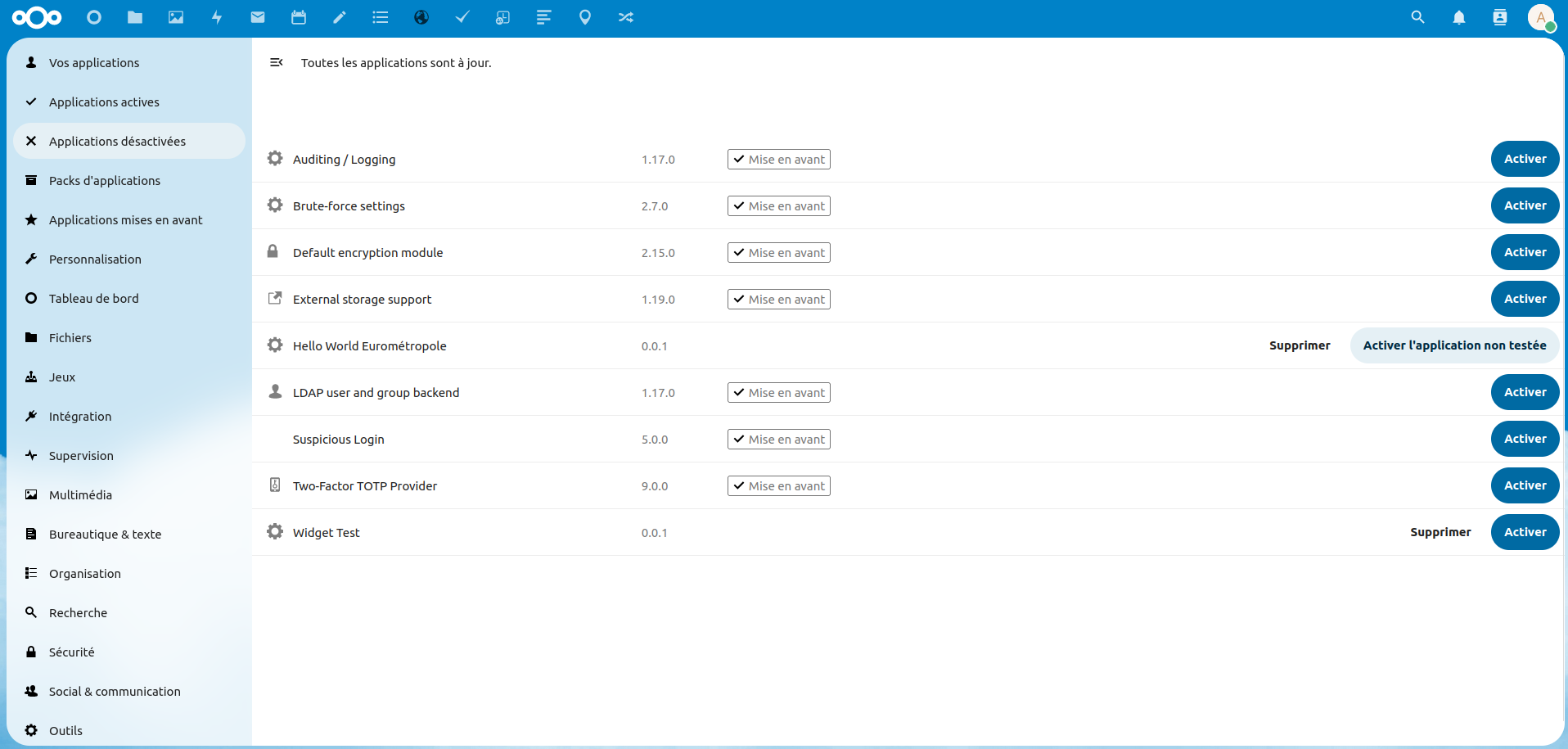
Une fois le code modifié, il suffit de déplacer la dossier de l'application dans le dossier de NextCloud, ensuite aller sur la page Application de Nexcloud (--url--/settings/apps/disabled) pour activer l'application (entrer le mot de passe du compte).
Divers
-
Pour les traductions elles doivent être faites dans le dossier
/l10n -
Les icônes sont a mettre sous l'extension
.svg -
Penser a avoir les dépendances
NPMinstallées -
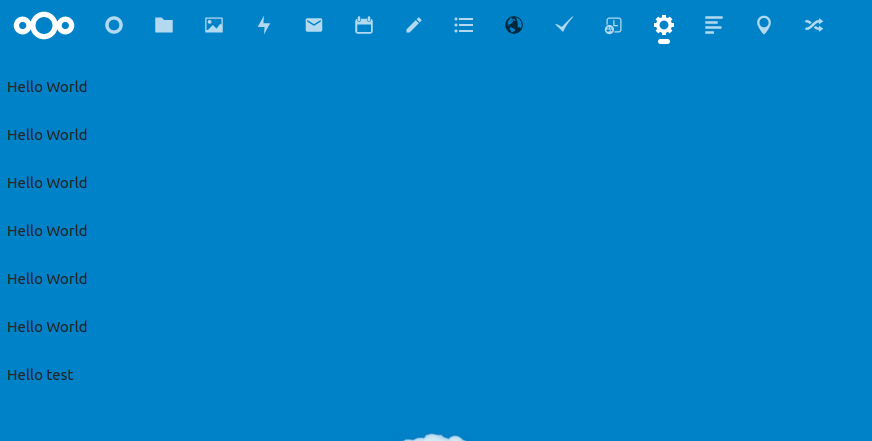
Pour vos tests vous pourrez rajouter le texte Hello World ! dans
templates/main.php. (A rajouter sous forme de language WEB :<p> Hello World !</p>)
Exemple de résultat
Divers
Liens
Documentation
Autres
- Tableau du projet sur Wekan
- Page NextCloud sur réseau
- Applications NextCloud
- NextCloud serveur sur GitHub
- Generateur d'applications squelettes
- Tutoriel complet création d'app
- Zone de dépot de fichiers externe
Opérations de maintenance courante
Accès à la console
Noter l'id du container nextcloud :
>$ docker ps | grep nextcloud
>docker exec -u www-data -ti ---id container Nextcloud--- bash
Lancement de la console depuis ./occ
Mise à jour
Lancement de la mise à jour à l'aide de la commande :
>./occ upgrade
Lister les applications
>./occ app:list
Listes des commandes les plus utiles
Pour accéder aux autres commendes : ./occ
Options
| CommandeRac | Commande | Description |
|---|---|---|
| -h | --help | Affiche l'aide pour la commande donnée. Lorsqu'aucune commande n'est donnée, affichez l'aide pour la commande list |
| -q | --quiet | Ne plus afficher de message |
| -V | --version | Affiche la version |
| --ansi, --no-ansi | Force (ou désactive --no-ansi) sortie ANSI | |
| -n | --no-interaction | Désactive les questions d'intéractions |
| --no-warnings | Désactive les Warning, laisse seullement les sortie des commandes | |
| -v, vv, vvv | --verbose | Augmentez la verbosité des messages : 1 pour une sortie normale, 2 pour une sortie plus détaillée et 3 pour le débogage |
Commandes générales
| Commande | Description |
|---|---|
| check | Regarde les dépendance du serveur |
| completion | Vider le script de complétion du scriptTv |
| help | Afficher l'aide d'une commande |
| list | Liste les commandes |
| status | Montre un statue |
| upgrade | Exécuter des routines de mise à niveau après l'installation d'une nouvelle version. La version doit être installée avant |
App :
| Commande | Description |
|---|---|
| app:disable | Désactive une application |
| app:enable | Active une application |
| app:getpath | Crée un chemin absolu vers une application |
| app:install | Installe une application |
| app:list | Liste toutes les applications |
| app:remove | Supprime une application |
| app:update | Met a jour une / des application(s) |
Config :
| Commande | Description |
|---|---|
| config:app:delete | Supprime une configuration |
| config:app:get | Recoit une configuration |
| config:app:set | Installe une configuration |
| config:import | Importe une configuration |
| config:list | Liste toutes les configurations |
| config:system:delete | Suprimme une configuration systeme |
| config:system:get | Recoit une configuration systeme |
| config:system:set | installe une configuration systeme |
Update
| Commande | Description |
|---|---|
| update:check | Cherche une mise a jour |
User
| Commande | Description |
|---|---|
| user:add | Ajoute un utilisateur |
| user:add-app-password | Ajoute un mot de passe pour un utilisateur |
| user:delete | Supprime un utilisateur |
| user:disable | Désactive un utilisateur |
| user:enable | Active un utilisateur |
| user:info | Montre les info des utilisateurs |
| user:lastseen | Montre la derniere connexion des utilisateurs |
| user:list | Liste les utilisateur configurée |
| user:report | Montre les utilisateur ayant accces |
| user:resetpassword | Réinitialise les mots de passes |
| user:setting | Lis et modifi les profile/parametres utilisateurs |
Versions
| Commande | Description |
|---|---|
| versions:cleanup | Supprime les versions |
| versions:expire | Fait expirer les versions de fichiers des utilisateurs |